From SQL Worksheet to Agentic AI: The Evolution of OCI Database Tools


The Oracle Cloud Infrastructure (OCI) Database Tools service was first made available in November 2021.
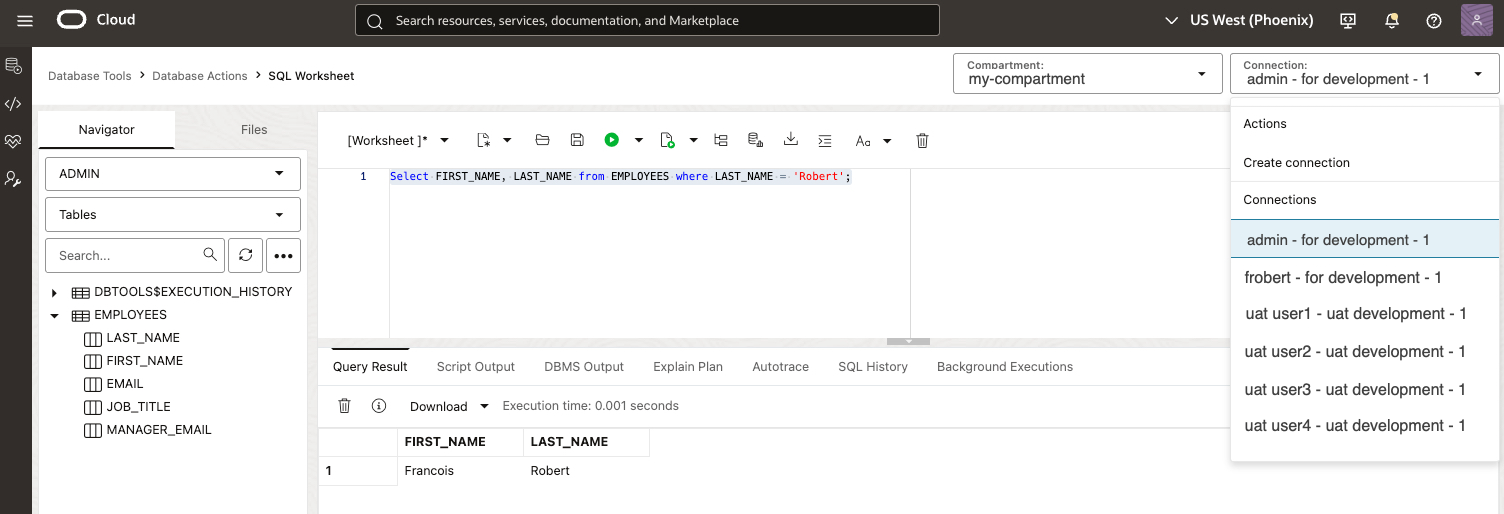
At the time, the main idea was simple and useful: create a managed OCI service where you could define reusable database connections, store sensitive connection material securely, and use those connections from a new SQL Worksheet.
That foundation is still there. But OCI Database Tools has grown quite a bit since those first days.
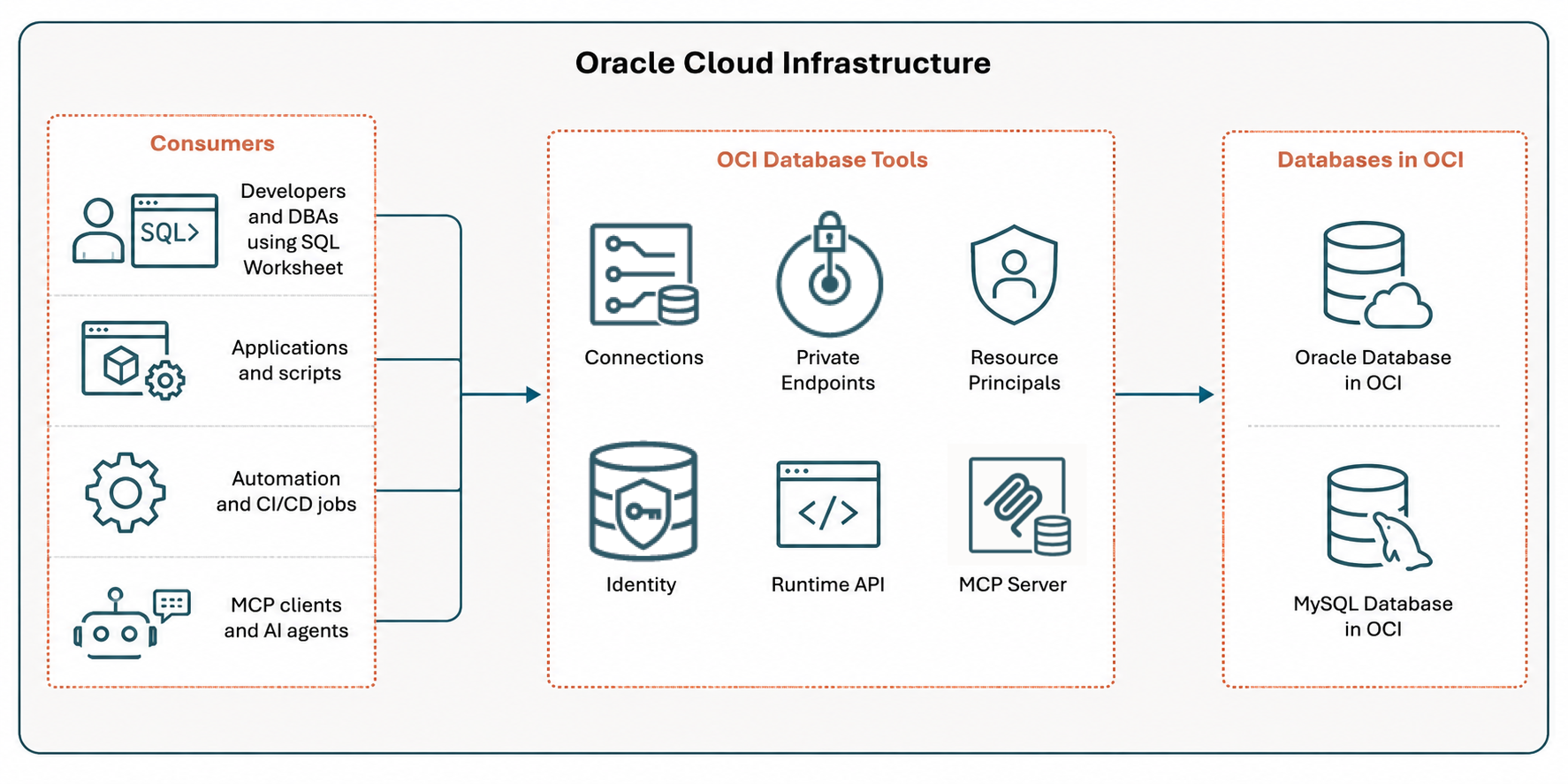
Today, in 2026, I think of OCI Database Tools less as "the service behind SQL Worksheet" and more as a governed access layer for databases in OCI, delivered as a managed OCI service. It helps users, applications, database code, and AI clients access database capabilities through managed OCI resources, IAM policies, Vault-backed secrets, private endpoints, resource principals, and now MCP servers.
This post is a high-level overview of how the service evolved. In particular, I want to show the main ideas, why the newer features matter, and how they fit together.
The Short Version
If I had to summarize the evolution of Database Tools in one sentence, it would be this:
Database Tools started with reusable database connections and evolved into a governed access layer for people, automation, database code, and AI-assisted workflows.
Here is the mental model I will use in this post:
| Capability | Question it answers |
|---|---|
| Connections | How do I define database access once and reuse it? |
| Private endpoints | How does Database Tools reach a private database? |
| Connection resource principal | Who retrieves the password or wallet secret? |
| Database Tools Identity | How does database code access OCI resources? |
| Runtime API | How do jobs and applications execute SQL through Database Tools? |
| IAM integration | How do I use token-based database authentication instead of passwords? |
| MCP Server | How do AI clients use controlled database capabilities safely? |
The Foundation: Connections

Let's start with the original building block.
A Database Tools connection is an OCI resource that contains the information needed to access a database. That includes things like the target database, the database user, connection details, the location of the password in OCI Vault, the database role, and whether a private endpoint is used.
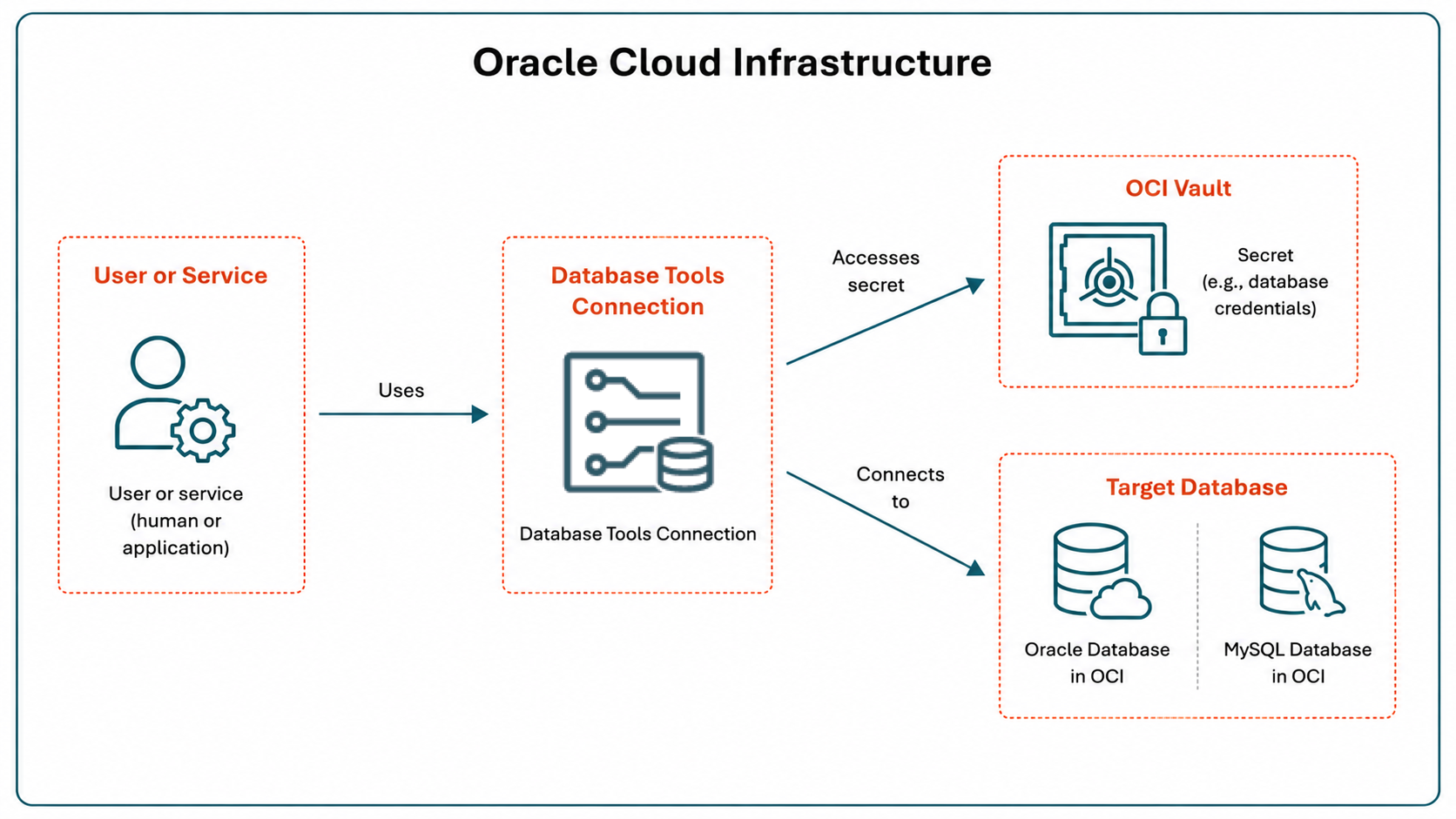
Database Tools Connections are OCI resources used to access Oracle Database or MySQL Database in OCI. They can be used with Autonomous AI Database, ADB Dedicated, Oracle Base Database, Exadata VM cluster databases, MySQL databases, and customer-managed databases running on OCI compute instances.
From the first release, this was an important architectural point: database access became a first-class citizen in the OCI ecosystem.
A Database Tools connection is not just a setting hidden behind a console page. It is an OCI resource that can be managed through the OCI Console, OCI SDKs, CLI, and Terraform. That matters for cloud architects and platform teams because database access can be provisioned, secured, automated, tagged, audited, and versioned like other infrastructure resources.
The important part is not only that the connection stores information. The important part is that the connection becomes reusable.
Instead of each user, script, or tool rediscovering the same hostnames, wallets, passwords, and network path, Database Tools lets you define a connection once and use it from supported Database Tools experiences.
The first visible example was SQL Worksheet.
SQL Worksheet uses a Database Tools connection to run SQL commands and scripts from the OCI Console. If you have multiple Database Tools connections, you can switch the worksheet from one connection to another without rebuilding the connection details each time.
Private Endpoints: Reaching Private Databases

Connections define how to connect.
Private endpoints answer a different question:
How does the Database Tools service reach a database that is not generally (publicly) reachable?
That distinction matters.
Many databases in OCI are deployed in private networks. That is a good thing. A production database should not need to expose a listener to the public internet just because a developer wants to run a SQL query or an automation job needs to execute a validation script.
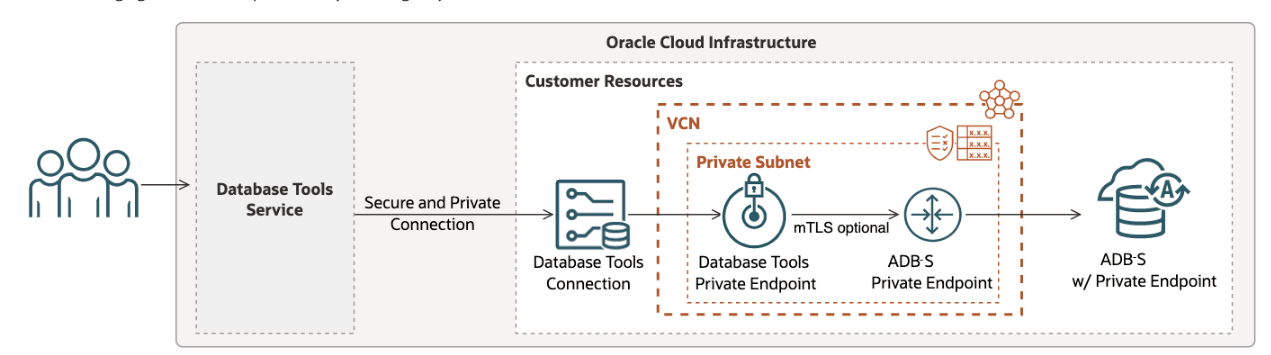
A Database Tools private endpoint provides a path from the Database Tools service into a customer VCN.
There is also a common source of confusion: A database private endpoint and a Database Tools private endpoint are not the same thing.
The database private endpoint makes the database privately reachable inside a VCN. The Database Tools private endpoint gives the Database Tools service a controlled way to reach that private database.
This is one of the first ways Database Tools moved beyond being a connection catalog. It became part of the secure access path.
Secrets: No hard-coded passwords
From the beginning, Database Tools used OCI Vault to avoid putting passwords directly in connection strings.
That is already a big improvement over copying passwords into scripts, local configuration files, or shared documents. A connection can reference a Vault secret instead of storing the password directly in the connection resource.
But even with Vault, there is still an important question:
Who is allowed to retrieve the secret?
This is where connection resource principal becomes important.
Connection Resource Principal: Who Retrieves The Secret?
When a Database Tools connection uses an authenticated principal, the currently authenticated OCI user is the identity used to retrieve the password or wallet information needed to establish the database connection.
That can be appropriate in some cases, but it has a drawback: users may need IAM permission to read the relevant secret bundle.
With a connection resource principal, it is the Database Tools connection resource that retrieves the secret.
That sounds like a small change, but from a security point of view it is significant.
It means an administrator can allow users to use a Database Tools connection without also granting those users direct permission to read the underlying password or wallet secret from Vault.
This distinction is worth making very explicit:
Connection resource principal does not necessarily change how the database authenticates the database user. The database may still receive the same username and password. What changes is who is authorized to retrieve the secret used to establish the connection.
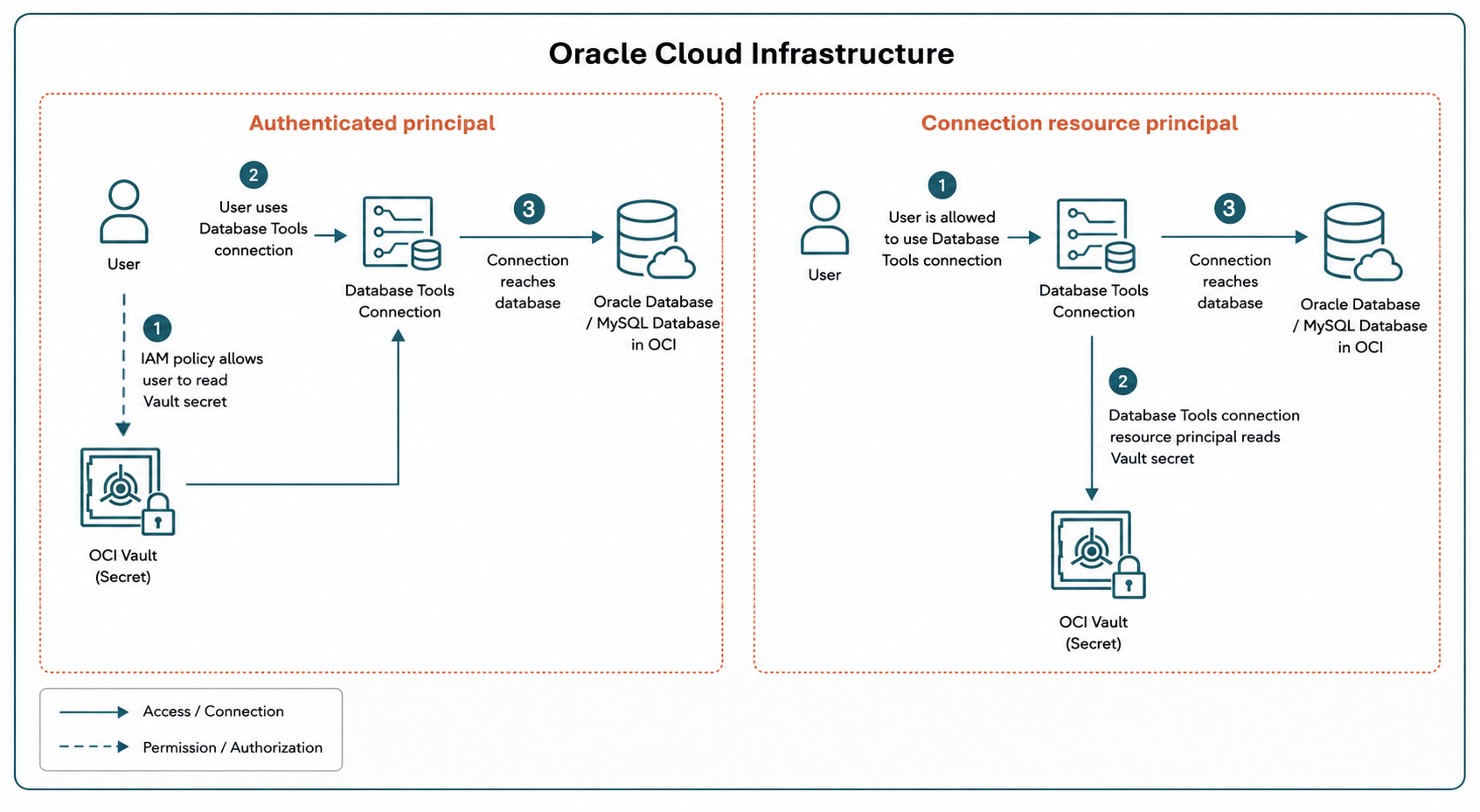
This is a good example of what I mean by "governed access layer."
The user is not just connecting to a database. The user is using an OCI resource that has its own identity, its own policies, and its own access boundaries.
Database Tools Identity: Access From Inside The Database

Connection resource principal helps Database Tools connect into a database.
Database Tools Identity solves a different problem:
How does code running inside the database access OCI resources?
For example, an APEX application or PL/SQL package might need to:
- Read or write files in Object Storage.
- Call an OCI Function such as the Document Generator Pre-Built Function.
There are different ways to solve that problem, but Database Tools Identity gives the database a managed, granular resource principal credential.
The important part is the direction of access.
With a connection, something outside the database is connecting into the database.
With Database Tools Identity, code inside the database is calling out to OCI services.
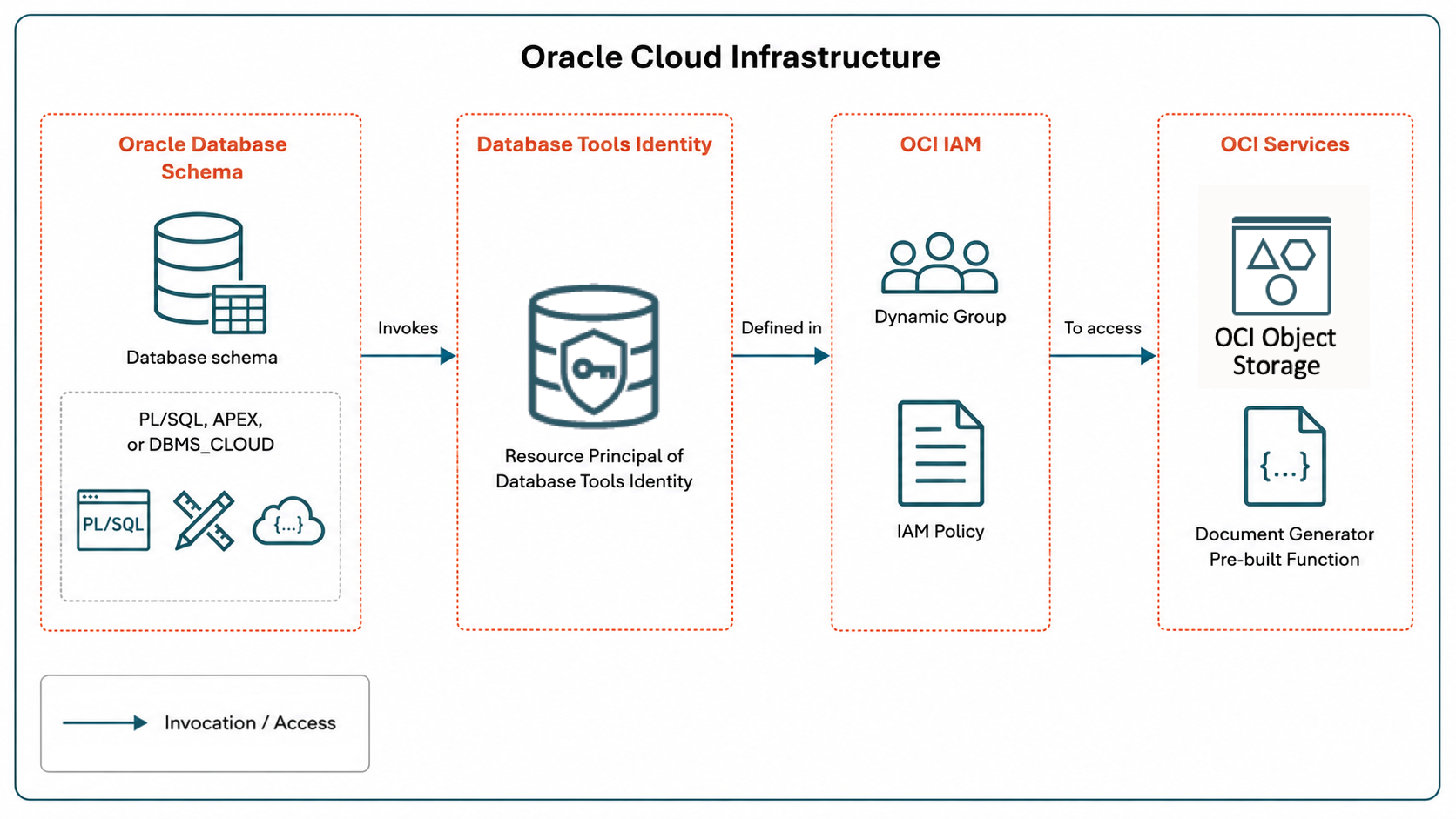
This is especially interesting because it can be a granular, schema-oriented access.
Different schemas can use different identities. Those identities can have different IAM policies. That supports least privilege better than sharing one broad credential across everything running in the database.
For example, a reporting schema might only need read access to one Object Storage bucket. An application schema might need permission to invoke a specific OCI Function. Those should not necessarily be the same identity or the same policy.
Runtime API: Using Connections From Automation
SQL Worksheet is interactive. But many database tasks are not interactive.
A CI/CD pipeline might need to run validation SQL after a deployment. A scheduled job might need to extract a report. An operations script might need to run a diagnostic query against a private database. A platform workflow might need to execute a controlled PL/SQL procedure without opening a direct database connection from the caller's environment.
The Database Tools Runtime API answers this question:
How do applications, scripts, and automation execute SQL through an existing Database Tools connection?
The OCI SDK describes the Database Tools Runtime API as a way to connect to databases through Database Tools connections. The Runtime client includes an operation to execute SQL statements on a Database Tools connection.
There is also an asynchronous execution path exposed through the OCI CLI and OCI SDK.
At a high level, this means that when automation calls Database Tools, Database Tools can use the configured connection, and the SQL runs against the target database through the same governed access layer.
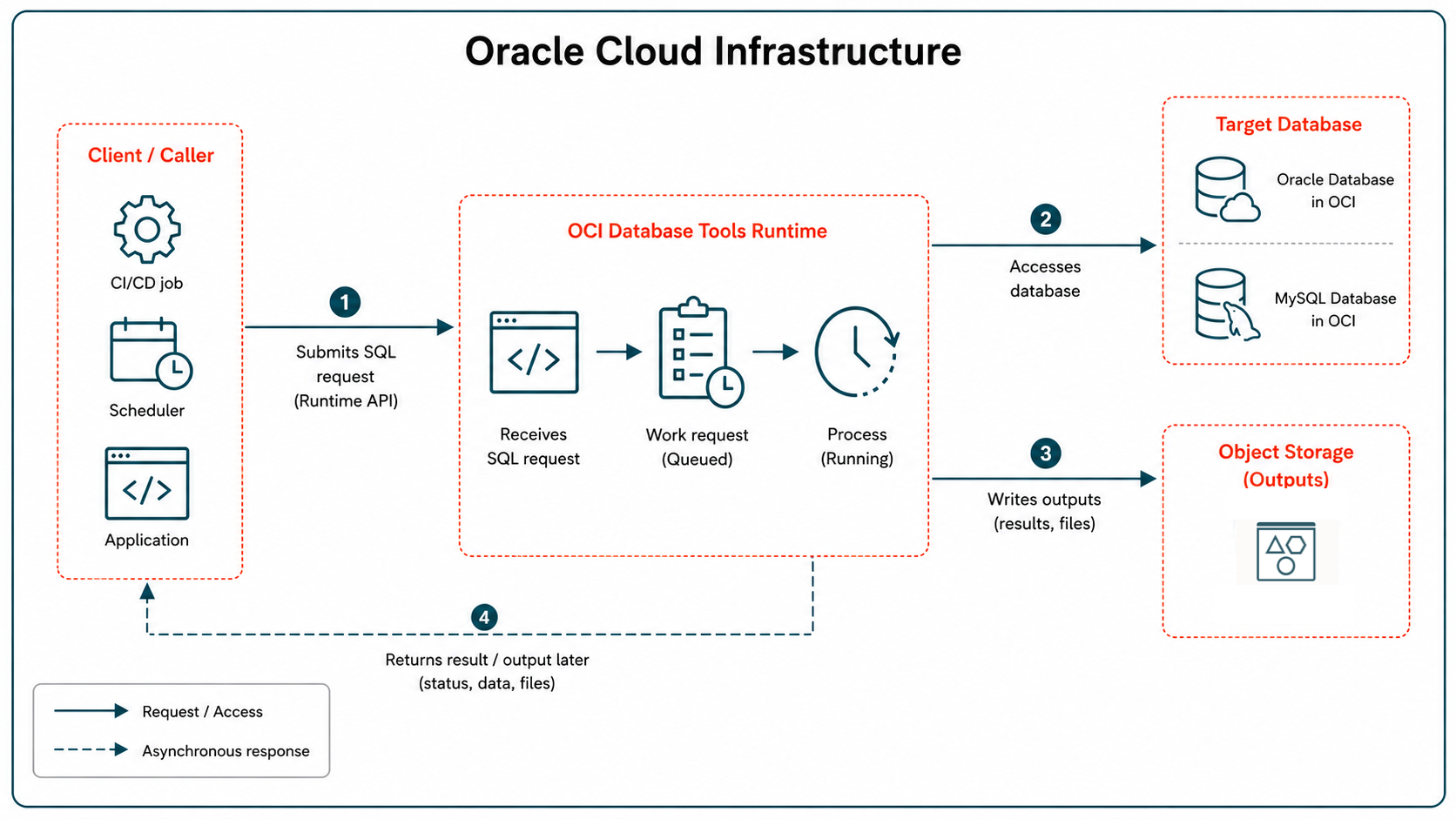
The asynchronous model is especially interesting for longer-running tasks. Instead of keeping a client waiting for a long SQL operation, the caller can submit work, track it (with a work request), and collect results later.
I am intentionally keeping this section high level. A deep dive could cover synchronous versus asynchronous execution, work requests, Object Storage input and output, result formats, and security patterns.
For this overview, the key point is simpler:
Database Tools connections are no longer only for interactive users. They can also be part of automation and application workflows.
IAM Integration: The Thread Through Everything
Identity and Access Management (IAM) is not one isolated feature in Database Tools. It is the thread running through the whole model.
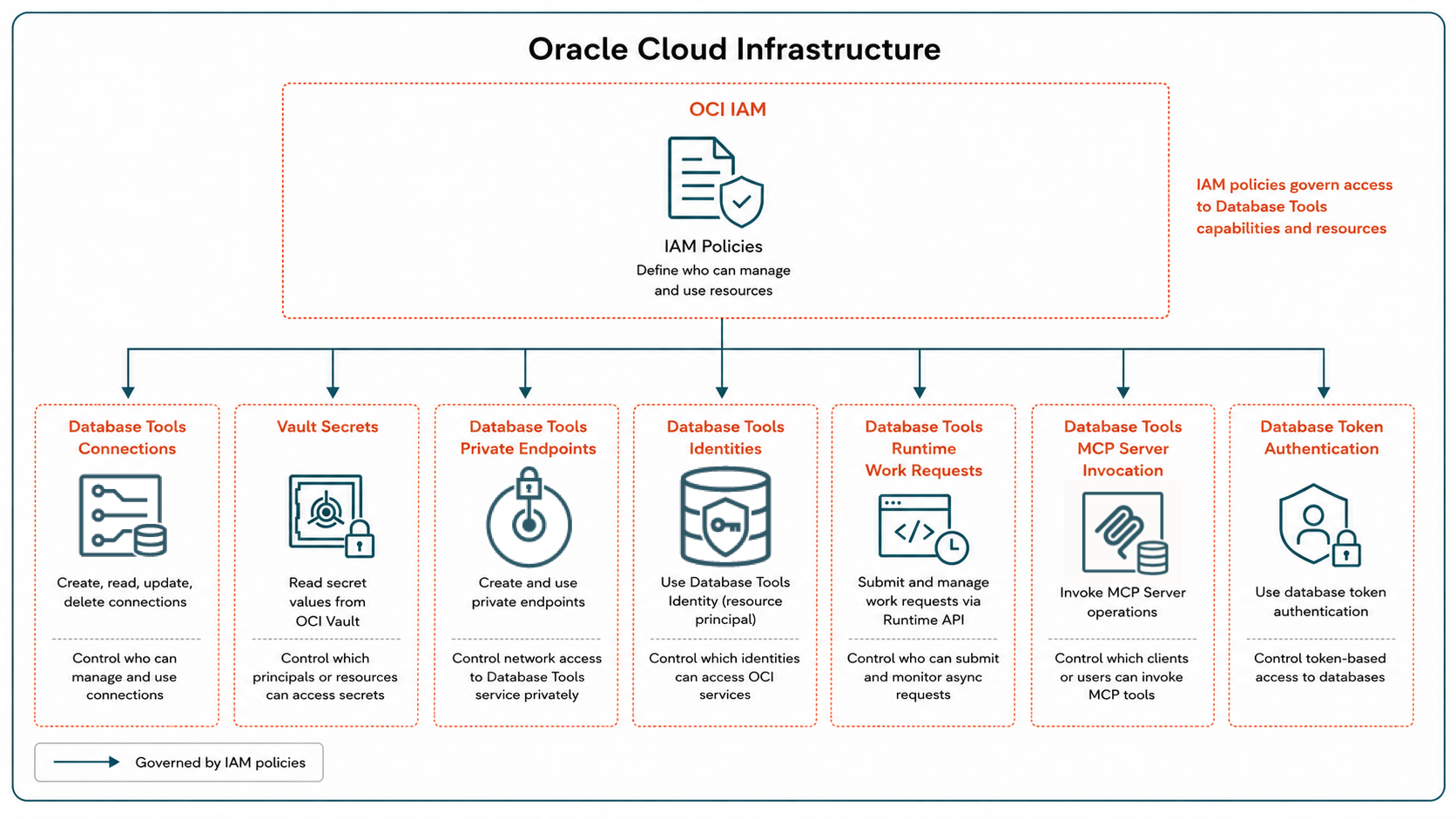
IAM can control:
- Who can create and manage Database Tools resources.
- Who can use a connection.
- Which principal can read Vault secrets.
- Which connection resource principal can retrieve a password or wallet.
- Which database identities can access OCI resources.
- Which users can invoke MCP Server tools.
- Which principals can use IAM token-based database authentication.
This is why I prefer the "governed access layer" framing.
Database Tools is not only helping you connect to databases. It is helping define who or what is allowed to use each access path.
Token-based database authentication
There is also another important evolution here: Database Tools connections can use OCI IAM authentication to connect to Oracle Database.
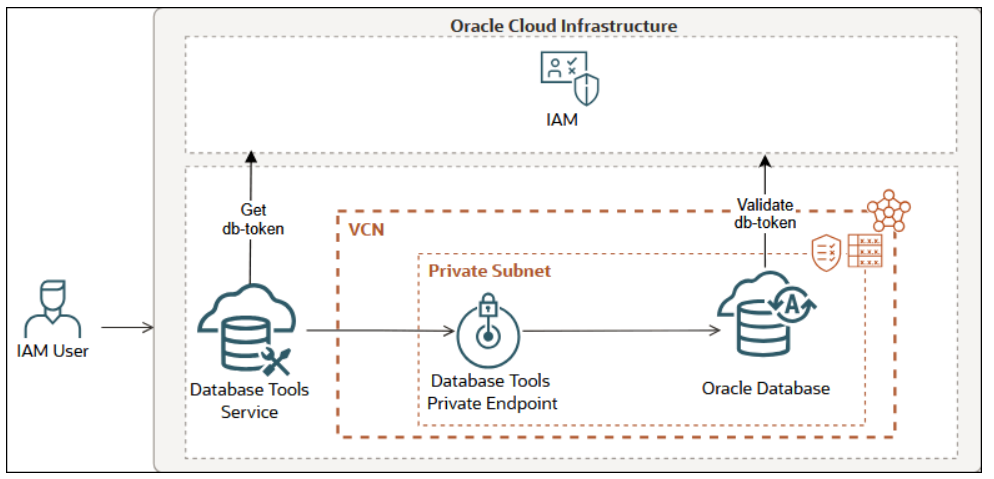
That is different from storing a database password in Vault and controlling who can retrieve it. With token-based authentication, the connection can authenticate to the database using IAM. This moves part of the database access model closer to the same identity system already used to govern OCI resources.
This is where the "first-class OCI resource" idea becomes more concrete.
MCP Server: Governed Database Access For AI Clients
Now we arrive at the newest and probably most visible part of the evolution: Database Tools MCP Server.
MCP stands for Model Context Protocol. At a high level, it gives AI clients a standard way to discover and use tools.
For databases, this is powerful. It is also very sensitive.
Connecting an AI assistant to a local database for a demo is interesting. Connecting AI clients to enterprise databases in a cloud environment requires a different level of governance.
The Database Tools MCP Server helps answer this question:
How do AI clients use controlled database capabilities safely?
The important word is controlled.
The goal should not be to give an AI client unlimited database access. A better model is to expose specific tools, SQL reports, and database operations through a governed path.
At a high level, the path looks like this:
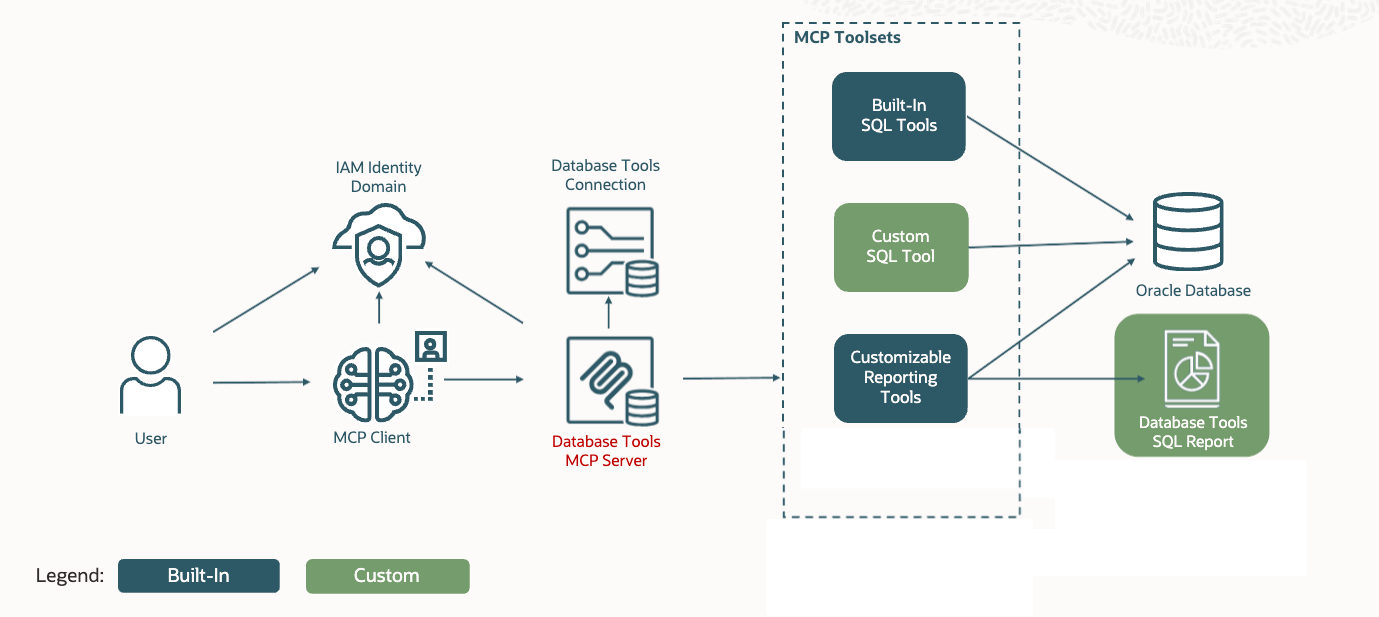
There are several important ideas here:
- The MCP client is not handed database credentials.
- Access is controlled with strong authorization and authentication (OAuth).
- Users or groups can be mapped to application roles.
- App roles control which tools and reports users can use.
- Toolsets define what capabilities are exposed.
- SQL Reports provide a controlled way to expose controlled SQL.
- Database Tools connections remain part of the access path.
- It uses remote streamable HTTP transport.
- Database session context can include propagated identity information for auditing and access logic.
That last point is easy to miss, but it is important.
When a custom SQL tool or SQL report runs through the MCP Server, the server can propagate end-user identity into the database session context. That makes it possible to connect MCP activity with database auditing and, in some cases, use session context values in SQL or PL/SQL logic.
Again, this is governance.
The interesting part is not simply "AI can query a database." The interesting part is:
AI clients can use database capabilities through an access path that can be authenticated, authorized, scoped, audited, and reused.
That is a very different architecture from putting a database password in a local AI plugin configuration file.
Conclusion
In 2021, Database Tools helped answer basic but important questions:
- Where is my database?
- How do I store the password securely?
- How do I launch a worksheet and run SQL?
- How do I connect without copying connection details everywhere?
Those questions still matter.
But the service now answers broader architecture questions:
- How does a managed service reach a private database?
- How do I avoid giving every user direct access to the underlying Vault secrets?
- How does a database schema call OCI services without long-lived user credentials?
- How does automation execute SQL through governed connections?
- How do AI clients use database capabilities without bypassing enterprise controls?
That is the shift.
Database Tools is no longer only about storing connection details. It is becoming a common access layer for multiple ways of working with databases in OCI.
That is why I now think of OCI Database Tools as a governed access layer.
In the next post, I will use the MCP Server section as a starting point and look more closely at the identity choices behind a secure MCP configuration.
See you there!